
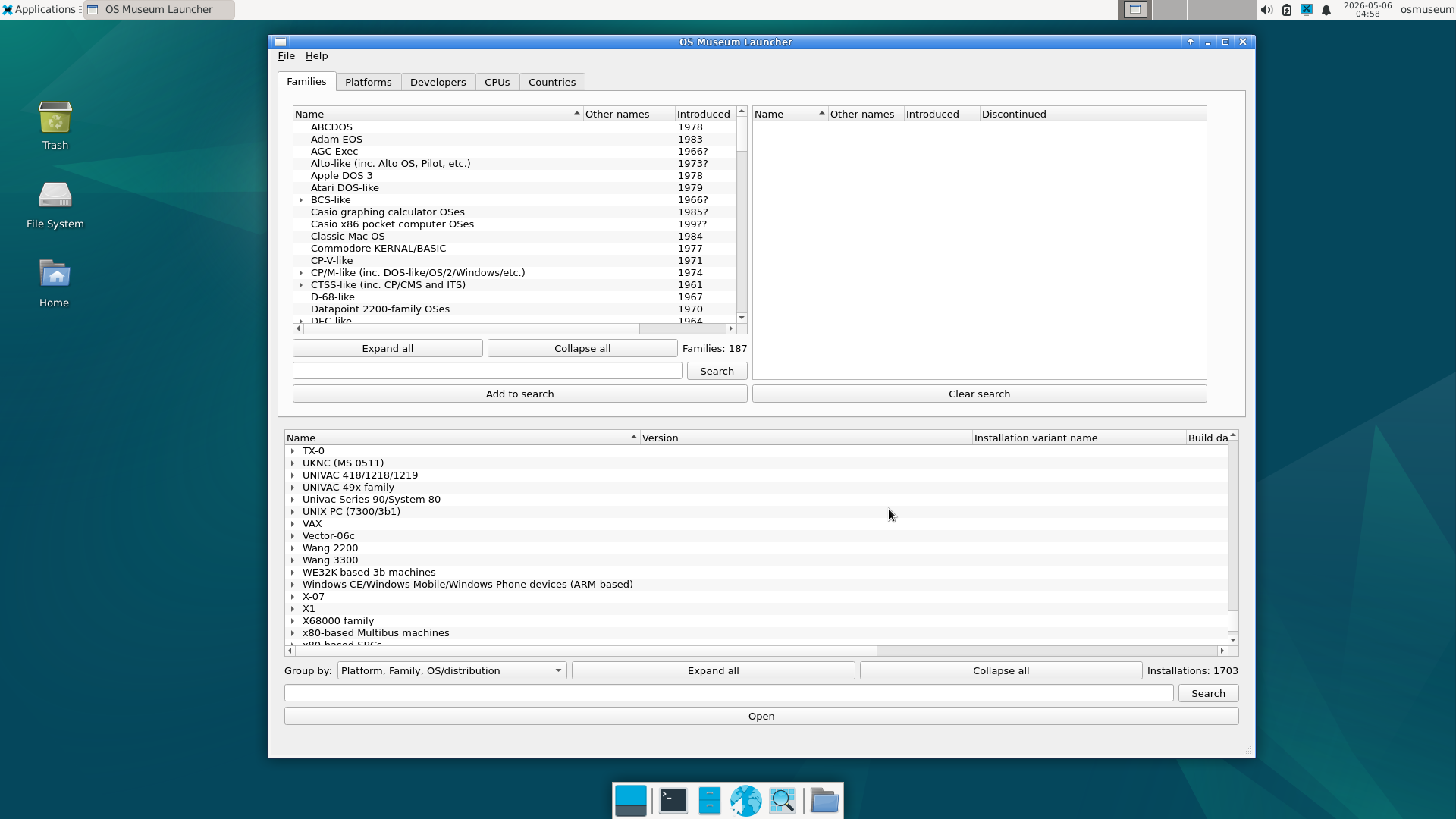
This is a virtual museum of operating systems (and standalone applications) running under emulation, implemented as a Linux VM for QEMU, VirtualBox, or UTM. A custom emulator-independent launcher is provided, and all OSes and emulators are pre-installed and pre-configured. The launcher includes a snapshot feature to quickly revert broken installations back to a working state. Hypervisor installers and shortcuts to run the VM on Windows, macOS, and Linux are also included. Want to see the earliest resident monitors? The ancestor of all modern OSes (CTSS)? The earliest versions of Unix? The first OS with a desktop metaphor GUI (Xerox Star Pilot/ViewPoint)? Early versions of mainstream OSes? If you want to explore historical OSes and platforms without having to worry about configuring/installing emulators and OSes or corrupting emulated installations, you’ve come to the right place. Just about every well-known OS and platform (and also a lot of obscure ones) is included in some form, spanning the entire history of stored-program computing from the Manchester Baby of 1948 (the first stored-program computer) to the present day. The catalogue covers, among many other things: The earliest mainframes: Manchester Baby test/demo programs, Mark 1 Scheme A/B/C/T (the earliest examples of system software that could be considered as an OS), various EDSAC software, etc. Later mainframes and minicomputers: CTSS, MVS, VM/370, TOPS-10/20, ITS, Multics, RSX, RSTS, and more Workstations and Unix variants: PERQ OSes, SunOS, IRIX, OSF/1, A/UX, NeXTSTEP, Plan 9, various BSDs, plus Linux distributions across the decades, and more Home computers: various CP/M variants, Apple II, Commodore 8-bit machines, Atari 8-bit, MSX, Tandy TRS-80, BBC Micro, ZX Spectrum, Sharp MZ, and more Personal computer operating systems: various DOS variants, OS/2, BeOS, Windows from 1.0 to early Longhorn betas, classic Mac OS through Mac OS X 10.5 PPC, and more Mobile and embedded: PalmOS, EPOC/Symbian, Windows CE, Newton OS, early Android and iOS where emulation permits, QNX, etc. Research and obscure systems: ZetaLisp, Smalltalk environments, Oberon, Plan 9, and many more that few people now have ever booted If a working version of an operating system exists somewhere, the goal is to have it here, in a form anyone can run on a reasonably modern laptop/desktop. By the Numbers 1700+installs 250+platforms 570+distinct oses 1948-nowera Downloads Both a full and a lite version are available. The full version ships with everything pre-downloaded and runs offline. The lite version downloads disk/tape/etc. images for guest VMs the first time they are run. Automatic and manual updates are supported on both editions so new installations land without re-downloading the whole VM. Download the Virtual OS Museum Screenshots 0. Launcher main window1. Launcher VM info2. Unix PC SVR2 and XVM RSXAFROS (XaAES) 8.12 - 00 TeraDeskAO-DOS 2.10 - 00 IntroATT Unix PC System V R2 3.51m - 00 File Manager and TerminalA_UX 3.1.1 - 00 Finder with utilitiesAmiga UNIX (AMIX) 2.1c - 00 OpenLook desktop with applicationsCP_M for PSI98 2.2 (6.31-Z) - 00 DIRCSIDOS 3.32 - 00 IntroCoherent 4.2.14 - 00 olwm with applicationsDomain_OS SR10.4 - 01 VUE LX 0.2.5 - 00 TerminalFlexOS 2.3 (COROS LS-B 4.01) - 03 2.0.6 - 01 TMTermHP-UX 11i v1 (B.11.11) - 00 CDE with utilitiesHuman68K 3.02 - 00 LHESIBM 1130 DMS V2M12 - 00 LET listingIBM OS_2 (Extended Edition) 1.1 - 00 Desktop ManagerIRIX 6.5.22m - 00 IMD with applicationsInferno Fourth Edition (20100115) - 00 GUI with applicationsLisaOS 3.1 - 02 LisaDrawMOS for BBC Master Compact 5.10 (Base) - 02 DesktopMac OS (Classic) 1.0 alpha; Sony Test (System '7.0', Finder 1983-10-04) - 00 FinderMac OS 9.0.4 - 00 Finder, Internet Explorer,and HelpMach386 2.6 1.0 (X108_MSD) - 00 X11 with applicationsMinerva 1.98 (QL_E (shares disk images with SMSQ_E QL_E)) - 00 Desktop with applicationsMinix 3.4.0rc6 - 00 X11 Terminal and LinksNeXTStep (68k) 3.3 - 00 Desktop with applicationsOS-9_x86 (a.k.a. OS-9000_x86) 6.1 - 00 XiBasePSI-OS 12.2 - 00 StartPlan 9 4th Edition - 01 acme filesystem serverQNX 1.2 - 00 bootRISC OS 3.11 (Minimal (Old boot)) - 00 Desktop with applicationsSILLIAC software collection - 00 Blob demoSINIX (PC-X) 1.2 - 01 Login PromptSX-WINDOW 3.1 - 00 DesktopSharp Personal CP_M for MZ-2500 (MZ-6Z001) 1.0a - 00 VCCPSoftlanding Linux System 1.0 - 00 ls uname and kernel sourceSolaris_SPARC 9 (s9_58shwpl3) - 00 CDE terminal help and file managerSyllable 0.5.2 - 00 Desktop with applicationsSymbOS 1.0 Beta - 01 AboutTru64 UNIX 5.1B - 00 CDE with utilitiesULTRIX_VAX 4.0 - 00 DECwindows with applicationsUNICOS 10.0.0.2 - 01 X11 with utilities More screenshots Why this exists While the state of software preservation has improved significantly over the past two decades, many of the existing software preservation projects are still not particularly accessible. When I started collecting emulator images (2003), there were only a few small archives of software images and the corresponding documentation, and relatively few emulators for anything other than well-known consumer-oriented platforms. Nowadays there are many large archives of historical software and documentation, and a lot of emulators for even a lot of very obscure platforms. However, while such efforts are valuable when it comes to keeping historical software available and runnable (and without them this project would have never been possible; see the credits page for a list of emulators, pre-installed images, and media archives I have used), it often still takes time and effort to get runnable VM installations from them. OSes may have complicated install procedures. Some may depend on particular device configurations within an emulator. Some will only run in certain emulator versions, breaking in later ones due to regressions. Some emulators might have complex configuration files, or may require a specific environment on the host system. This project is an attempt to keep reachable as much of the history that’s been preserved in various places as possible. Not theoretically reachable. Not “bootable in principle if you assemble the right toolchain on a Tuesday.” Reachable. You click an entry, it runs, and where possible it runs with software of the era already loaded the way someone might actually have used the machine at the time. The work behind it This is the result of over 20 years of collecting. OS installations have been sourced from various places. Some have been downloaded as pre-installed images, whereas others were installed from images of original install media. Some were installed in less than an hour, whereas others took almost a week. A decent number only run in particular emulator versions due to regressions in later versions, and some emulators needed minor patches to run on modern Linux or to play nice with the launcher. A few emulators have been patched to run OSes that were previously broken. Many installations also include various add-on software - applications, development tools, games, utilities, etc. - set up the way it actually might have been used. This is still far from finished; I have many more images sitting around that I have yet to install and emulators I want to fix; check out my YouTube channel, blog, or BlueSky to see what I’m currently working on. Support the project This is a personal project, run and curated by one person, sustained by patience and time. If you find it interesting, the easiest ways to support it are: Patreon for ongoing support Ko-fi for one-off contributions Discord/Fluxer to talk about it, ask questions, or suggest new platforms/OSes to add (new entries may not be added immediately since I’ve got a lot of stuff to add) GitLab to submit bug reports or patches related to the launcher and scripts Telling someone who works on, writes about, or studies the history of computing that this exists
AI & Tech·May 19, 2026
I’ve built a virtual museum with nearly every operating system you can think of
This is a virtual museum of operating systems (and standalone applications) running under emulation, implemented as a Linux VM for QEMU, VirtualBox, or UTM. A custom emulator-independent launcher is provided, and all OSes and emulators are
Hacker News6 min readSingle source
The gist
5-point summary · 1 minThis is a virtual museum of operating systems (and standalone applications) running under emulation, implemented as a Linux VM for QEMU, VirtualBox, or UTM. A custom emulator-independent launcher is provided, and all OSes and emulators are
- This is a virtual museum of operating systems (and standalone applications) running under emulation, implemented as a Linux VM for QEMU, VirtualBox, or UTM.
- Just about every well-known OS and platform (and also a lot of obscure ones) is included in some form, spanning the entire history of stored-program computing from the Manchester Baby of 1948 (the first stored-program computer) to the present day.
- By the Numbers 1700+installs 250+platforms 570+distinct oses 1948-nowera Downloads Both a full and a lite version are available.
- Some emulators might have complex configuration files, or may require a specific environment on the host system.
- Some have been downloaded as pre-installed images, whereas others were installed from images of original install media.
In this article
AAPL· Apple
—
Loading…
Yahoo Finance
Integrity note · Xela does not rewrite or paraphrase article content. The excerpt above is the source publication's own words, sanitized for display. For the full piece — including any quotes, charts, or images — read it at Hacker News. Xela's rewritten version is off for this story, so there's no editorial angle attached — you're getting the source's reporting unfiltered. When the rewrite is on, we add a What this means block underneath with the operator/trader takeaway.
What people are saying
Discussion
Hot takes
0/280
Loading takes…
Comments
Discussion · 0
Sign in to comment, like, and save articles.
Sign inLoading comments…